Introduction
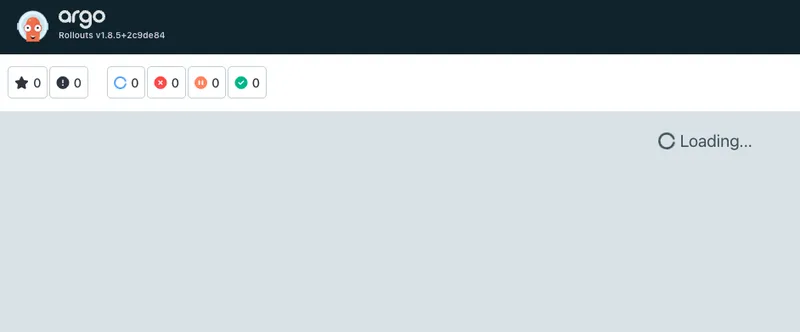
In the Argo Rollouts dashboard, the NAMESPACE field had turned from a dropdown into a disabled input box. All I could see was the default namespace, and there was no way to switch somewhere else and look at other rollouts. I went through the source code, checked permissions, turned on debug logs, and after all that the culprit turned out to be a single rollout that had the wrong type in one resource field, which made the whole cluster-wide list fail to decode. Let me write down how I tracked it down.
The symptom
The dashboard won’t open the namespace dropdown, so I hit the backend endpoint with curl directly:
curl https://rollout.example.com/api/v1/namespace
It returned:
{"namespace":"argo-rollouts"}
The endpoint is called /api/v1/namespace, so it’s easy to assume it returns a list of all namespaces. It doesn’t. It returns two fields: namespace is the currently selected namespace, and availableNamespaces is the list you can switch to. Normally the response should carry the second field, something like this:
{"namespace":"argo-rollouts","availableNamespaces":["ns-a","ns-b","ns-c"]}
Now availableNamespaces was missing entirely. One detail here: when protobuf is converted to JSON, empty repeated fields get dropped altogether, so “the field is gone” means “the field is empty”. The frontend gets an empty array and renders the dropdown as a disabled input box, which looks exactly like “the namespace can’t be switched”.
Pitfall 1: I suspected permissions first, but RBAC was fine
My first reaction was that the ServiceAccount behind the dashboard didn’t have enough permission to list rollouts across all namespaces.
So I checked:
kubectl get clusterrole argo-rollouts-dashboard -o yaml
The ClusterRole does have get/list/watch on rollouts, and it’s a ClusterRole, so it applies cluster-wide. Then I verified with kubectl:
kubectl auth can-i list rollouts -A --as=system:serviceaccount:argo-rollouts:argo-rollouts-dashboard
It returned yes.
Still not convinced, so I started a debug pod bound to the same ServiceAccount and hit the K8s API with curl directly:
TOKEN=$(cat /var/run/secrets/kubernetes.io/serviceaccount/token)
curl -sk -H "Authorization: Bearer ***" \
  https://kubernetes.default.svc/apis/argoproj.io/v1alpha1/rollouts
200, with a 1.6MB response, and the whole rollout list was in there. So the permission theory was out.
Pitfall 2: I suspected the network protocol and the version, neither was it
client-go defaults to HTTP/2 and uses gzip as well, so I wondered whether the transport layer was the problem. Using the same SA inside the cluster, I tried HTTP/1.1 and HTTP/2 separately, and both responses were the full 1.6MB. gzip decompression was fine too.
Then I suspected the pod state. I spun up a brand-new dashboard pod with the same image and the same ServiceAccount, hit the endpoint, same result — availableNamespaces was still empty. I switched to the master branch to read the code, and the implementation was identical to what’s running in production, so this isn’t a known fix.
The breakthrough: another endpoint threw a decode error
The dashboard process itself can list rollouts fine, because the per-namespace endpoint works:
# replace {namespace} with any namespace that has a rollout deployed
curl http://127.0.0.1:3100/api/v1/rollouts/{namespace}/info
Data came back. So the client itself isn’t broken. I went through the namespaces one by one, and on one of them the endpoint threw an error outright:
{
  "code": 2,
  "message": "json: cannot unmarshal string into Go struct field ResourceRequirements.items.spec.template.spec.containers.resources.limits of type v1.ResourceList"
}
That error message is the key. It says that for some object’s spec.template.spec.containers[].resources.limits field, it expected a map but got a string, so decoding failed.
The real culprit: resources.limits written as a string
I dumped every rollout in the cluster as JSON and checked the resources field in each template:
kubectl get rollouts -A -o json
Found exactly one broken one:
resources:
  limits: "memory:6Gi"
The correct form is:
resources:
  limits:
    memory: 6Gi
One is a string, the other is a map. And that single object took down the whole cluster-wide list query.
Why one bad object can bring down the entire list
This is how the Argo Rollouts server gets its namespace list, in the source:
rolloutList, err := s.Options.RolloutsClientset.
    ArgoprojV1alpha1().
    Rollouts("").
    List(ctx, v1.ListOptions{})
if err == nil {
    for _, r := range rolloutList.Items {
        namespaces = append(namespaces, r.Namespace)
    }
}
return &rollout.NamespaceInfo{Namespace: current, AvailableNamespaces: namespaces}, nil
It first does a cluster-scoped Rollouts("").List, dedupes the namespaces of every rollout in the result, and uses that as the switchable list.
The catch is that client-go’s typed client decodes the list result as a whole. If one object has the wrong field type, decoding the entire list fails, err is not nil, the loop never runs, and availableNamespaces stays empty. And the if err == nil in the code swallows that error silently, so the endpoint still returns 200 — only the list is empty.
The per-namespace endpoint didn’t break because it only queries rollouts in a single namespace, and it happened that the bad object wasn’t in that one.
A side note on the design
While digging through the source I noticed that availableNamespaces means “namespaces that have Rollout resources”, not every namespace in the cluster. So even after this bug is fixed, the dropdown will only show namespaces with rollouts deployed. If you want to list all namespaces, kubectl is still the way:
kubectl get ns
Conclusion
An inconspicuous YAML type mistake can make the dashboard’s namespace list disappear entirely, and the server doesn’t report any error — it just returns an empty array. Debugging a design that silently swallows errors like that really is a slog.
What I took away from this one:
- A 200 from an endpoint doesn’t mean the logic is correct; an empty array could also be an error that got swallowed
- The typed client decodes the list as a whole, so one bad object can drag down the entire list
- When permissions, network, and version all check out, go look at the errors from other endpoints — that usually pins it down right away
- YAML type mistakes like this are best stopped at the CI or ArgoCD validation stage, so bad objects never make it into the cluster
Feel free to follow my blog at www.bboy.app
Have Fun