
Introduction
Today I stumbled on an article about the Finger protocol (Finger: the 1971 social network that never died, written by Andros Fenollosa at en.andros.dev) and learned there was a social network back in 1971, and my Mac had the client preinstalled all along. The article mentions happynetbox.com, a site that turned the Finger protocol into a social network. I signed up for an account, wrote a script that syncs my local ~/.plan file to it, and set up a morning job that translates updates to Chinese for me. This post covers the whole process and the pitfalls.
What is Finger
Finger is a protocol from 1971, built at Stanford’s SAIL lab. Back then, to see who was online you had a command called WHO that dumped out a long, hard-to-read list. An engineer named Les Earnest kept seeing colleagues run their fingers down the screen looking for names, so he wrote a program that could look up a specific user: real name, location, last login time, unread mail.
RFC 742 came in 1977, and RFC 1288 in 1991 finalized it. What it does is simple: the client connects to port 79 on the remote host, sends one line with a username, and the server spits back the content of that user’s .plan file in their home directory.
.plan was your personal homepage. Back then programmers would write what they were up to in it. John Carmack used .plan as a dev diary, and announced the plan to open-source the Doom source code through .plan in 1997. That’s why Finger is called the first social network, the first microblog.
Turns out my Mac still ships the finger command:
$ finger bboysoul
Login            Name             TTY      Idle  Login  Time   Office  Phone
bboysoul         Bboy Soul        console 23:07  Wed    11:07
What is Happynetbox
Happynetbox (https://happynetbox.com) is an experimental site by Ben Brown. It’s basically a public finger server. Create an account, write some text, and anyone can see it in their terminal with finger [email protected].
No likes, no follows, no feed, no archive. You write a paragraph on the web page, tell your friends “finger me”, done. The site owner’s words: “Will anyone see it? Only if they truly love you.”
I tried it:
$ finger [email protected]
# MONDAY

We went down to HOUSTON this weekend to see the ASTROS play...
The owner keeps a diary in his happy box — his family going to a baseball game, and a CI pipeline that took weeks to finally pass. So much flavor.
Signup and login
Signup is simple: fill in a handle and a password on the web page. My handle is bboysoul.
Login is a standard POST form, handle + password to /login, returns 302 on success. curl handles it fine:
$ curl -c ~/.happynetbox.cookie -X POST https://happynetbox.com/login \
    -d "handle=bboysoul&password=xxx"
The cookie lasts about 9 days.
Finding the posting API
There’s an official CLI on npm called happynet, but it’s read-only (subscriptions, checking updates), no posting. I read the source — it just sends a username to port 79 and grabs content. No write functionality at all.
Posting goes through the web page. After login, https://happynetbox.com/post/<handle> is an edit page: a textarea and a submit button. POST to it with a content field:
$ curl -b ~/.happynetbox.cookie -X POST https://happynetbox.com/post/bboysoul \
    --data-urlencode "content=Myblog: https://www.bboy.app"
Returns 302 with updated=true, and you’re done.
Automating the .plan sync
Since posting is just a POST, a local script can sync ~/.plan to it.
I wrote happynetbox_plan_sync.sh:
- Check if the cookie is still valid (hit the edit page, see if it returns 200 or 302)
- If not, re-login automatically with the stored password
- Hash
~/.planwith md5 and compare with the last sync cache - Exit silently if unchanged, POST if changed
Then a cron job runs it every 30 minutes:
0,30 * * * * bash ~/.hermes/scripts/happynetbox_plan_sync.sh
So when I edit ~/.plan, within 30 minutes the whole world can finger me and see the new content. This is how the Finger protocol is meant to be played — edit a local file, others see it in their terminal.
Morning translation digest
Syncing alone isn’t enough — other people update content on happynetbox too. I wrote a collector script that fingers @happynetbox.com to get the 25 most recently updated handles, then fingers each one to grab the content, outputting it in a fixed format.
Another cron job runs at 6am every day; when content changes, an AI translates it to Chinese and pushes it to me. It uses monitor mode: the script output is hashed and compared, completely silent (0 tokens) when nothing changed, and only the people who updated get translated.
That way I wake up and see the translated updates of whoever touched their happy box. A retro protocol paired with modern AI — pretty fun.
Pitfalls
Pitfall 1: the finger server doesn’t support Chinese
The first time I wrote .plan in Chinese, the web page looked fine but finger output was garbled:
$ finger [email protected]
finger: reading from network: Illegal byte sequence
[happynetbox.com]

Myblog: https://www.bboy.app

@*
Using nc to connect to port 79 and look at the raw bytes, the server was outputting the UTF-8 Chinese with the wrong encoding, mixed with garbage bytes. It’s a bug on the happynetbox server side — the 1971 protocol only knows ASCII.
Solution: only write English in .plan. I also added a check in the script that refuses to sync when non-ASCII characters are detected:
if LC_ALL=C grep -q '[^ -~]' "$PLAN_FILE"; then
  echo "⚠️ contains non-ASCII characters, please use English only"
  exit 1
fi
Pitfall 2: nc requests need CRLF
A plain echo "bboysoul" | nc happynetbox.com 79 returns “Nobody lives here” because echo sends just \n, and the finger protocol wants \r\n at the end:
printf "bboysoul\r\n" | nc happynetbox.com 79
Pitfall 3: cookies expire
The cookie lasts about 9 days; after that the posting endpoint 302s to the login page. The script needs a cookie validity check plus auto re-login, or the sync job silently dies.
Current result
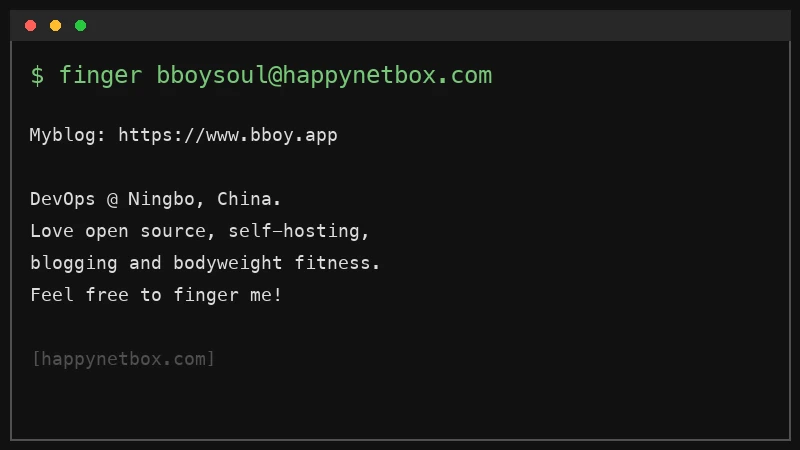
My happy box right now:
Myblog: https://www.bboy.app

DevOps @ Ningbo, China.
Love open source, self-hosting, blogging and bodyweight fitness.
Feel free to finger me!
Want to see it:
$ finger [email protected]
Feel free to follow my blog at www.bboy.app
Have Fun